By CubixKraft Team
What Are AI Agents? A Complete Guide for Business Leaders (2026)
AI agents are no longer a futuristic concept — they're actively running sales pipelines, handling customer support, and managing operations at companies right now. But what exactly are they, and how are they different from the AI tools you've already heard of?
What Is an AI Agent, Exactly?
An AI agent is a software system powered by artificial intelligence that can perceive its environment, make decisions, and take actions to achieve a specific goal — without needing a human to direct every step.
Think of it like hiring a highly capable digital employee. You give them a goal ("qualify all inbound leads and book meetings"), they figure out how to get there, use the tools available to them (your CRM, email, calendar), and execute — autonomously.
An AI agent = AI brain + ability to take real actions in the world. It doesn't just answer questions — it does things. It can send emails, update databases, call APIs, book appointments, and coordinate with other agents.
This is the crucial distinction: traditional AI tools (like a chatbot or a content generator) respond. AI agents act. They work across your entire stack — CRMs, support tools, data warehouses, communication channels — running workflows end-to-end with minimal human intervention.
How Do AI Agents Work?
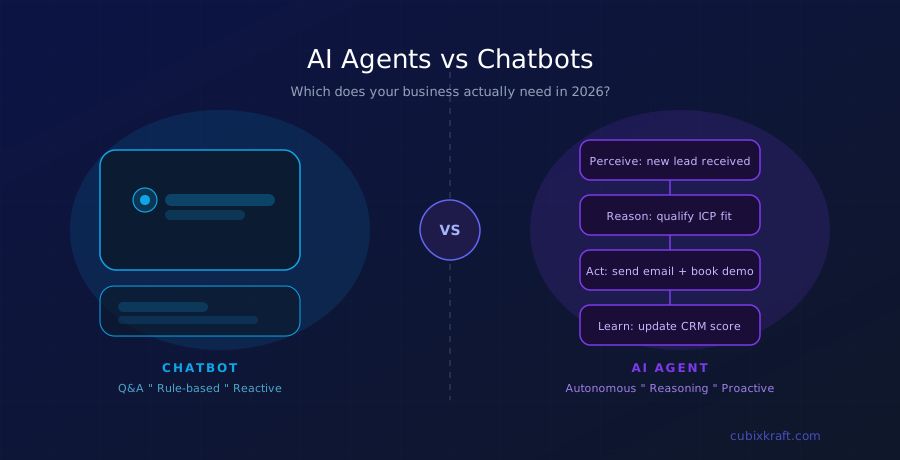
Every AI agent runs on a four-step loop that repeats continuously:
The agent reads its environment — emails, form submissions, database changes, API events, or user messages.
Using an AI model (like a large language model), it understands context, applies business rules, and decides what to do next.
It executes — sends a message, updates a record, triggers another workflow, calls an API, or escalates to a human.
The results feed back in, allowing the agent to improve its decisions over time based on outcomes.
Platforms like CubixKraft's Autonomy Cloud add an orchestration layer on top of this loop — so multiple agents work in coordination, with policy guardrails, human override options, and full event logging. You're not just deploying one agent; you're building an autonomous workforce.
AI Agents vs Chatbots: What's the Real Difference?
This is the most common question we get — and it's a fair one, because both involve AI and conversation. But they're fundamentally different in what they can do.
| Feature | Traditional Chatbot | AI Agent |
|---|---|---|
| Primary function | Answer questions | Complete multi-step tasks |
| Decision making | Rule-based scripts | AI-powered reasoning |
| Memory | Single session only | Persistent across interactions |
| Tool use | None or very limited | CRMs, APIs, databases, email |
| Autonomy | Waits for instructions | Self-initiates based on triggers |
| Multi-agent coordination | No | Yes — can delegate to other agents |
| Handles ambiguity | Falls back to "I don't know" | Reasons through uncertainty |
"A chatbot is a conversational interface. An AI agent is a member of your team."
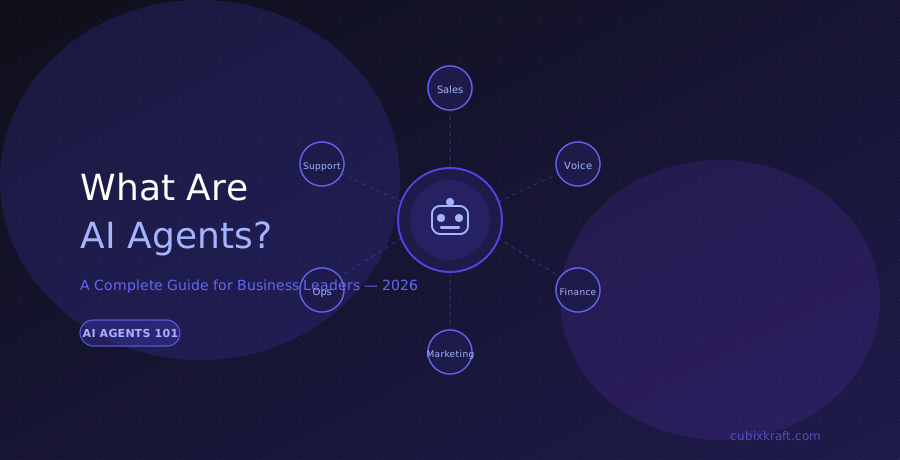
Types of AI Agents Used in Business
Not all AI agents are the same. Different agent types are built for different jobs. Here's how they break down in a business context:
1. AI Sales Agents
These agents handle the top and middle of your sales funnel — qualifying inbound leads, sending personalised follow-up sequences, answering product questions, and booking demos. They work 24/7 and never let a lead go cold.
2. AI Support Agents
Support agents triage and resolve tickets across email, chat, and social channels. They can handle up to 70–80% of queries automatically, and intelligently escalate edge cases to human agents with full context — so your team picks up exactly where the agent left off.
3. AI Operations Agents
Ops agents monitor your systems around the clock — watching dashboards, detecting anomalies, triggering remediation workflows, and syncing updates across tools like Jira, Slack, and your internal databases.
4. AI Voice Agents
Voice agents handle inbound and outbound calls — routing queries, qualifying leads over the phone, and resolving common issues — all in your brand's tone and language.
5. Internal Automation Bots
These handle the repetitive internal work that costs your team hours each week: approvals, expense reconciliation, onboarding checklists, report generation, and HR workflows.
Real-World Examples of AI Agents
A customer submits a return request at 11 pm. An AI support agent reads the request, checks the order status in the OMS, verifies return eligibility, initiates the return, sends a prepaid label, and updates the CRM — all in under 60 seconds. Zero human involvement.
A lead fills out a demo form. An AI sales agent enriches the lead data, scores it based on ICP fit, sends a personalised outreach email, and books a meeting in the account executive's calendar — before the human team even logs in the next morning.
An AI ops agent detects a spike in failed transactions, cross-references it with a recent deployment, flags it as a likely regression, creates a Jira ticket, and notifies the on-call engineer — all within 90 seconds of the anomaly appearing.
Key Benefits of AI Agents for Your Business
Deploying AI agents isn't just about cutting costs — it's about creating a fundamentally different kind of organisation. Here's what businesses consistently report after deploying autonomous agents:
Agents never sleep, take holidays, or call in sick. Your business runs continuously across time zones.
An agent can process 1,000 leads or support tickets in the same time a human handles 10.
Agents follow your rules exactly, every time. No off-days, no deviation from process.
Teams can focus on high-judgement work while agents handle the repeatable, high-volume tasks.
Every action an agent takes is logged. You have a complete audit trail — something humans can't provide.
Handling 10x the volume? Deploy more agents in minutes, not months of hiring.
How to Get Started with AI Agents
The most common mistake businesses make is trying to automate everything at once. A better approach:
Start with one high-impact, high-repetition workflow. Look for processes that are rule-based, happen frequently, and currently eat significant human time. Customer support ticket triage, lead qualification, and invoice processing are all excellent starting points.
Then expand. Once your first agent is deployed and delivering measurable results, add another. Over time, your agents start coordinating — a sales agent hands off to a support agent, which escalates to an ops agent — and you've built an autonomous operating layer for your business.
At CubixKraft, we call this the Autonomy Cloud: a full-stack platform where your AI agents, their workflows, integrations, and decision logic all live — observable, controllable, and continuously improving.
Ready to Deploy Your First AI Agent?
CubixKraft helps businesses design and deploy AI agents that actually work — integrated with your existing stack, with full human oversight built in.
Book a Free Strategy Call →